nama :epic duel
category:play now
link :http://epicduel.artix.com/play-now/default.asp?srcValue=1
game url://epicduel.artix.com
How To Play
1. CREATE A NEW USER ACCOUNT
EpicDuel requires using a
Battleon Games Master Account to play,
Sign Up Now.
The master account links all your
Artix Entertainment games together.
You can earn special achievements by playing all Artix games!
2. STARTING THE GAME
To start EpicDuel, click
Play Now! to access the game client. EpicDuel can be played in your web-browser for free with no download and no installation.
The only requirement is the Adobe Flash Player 9 browser plugin. If
you don't have the latest plugin, you can get it here for free:
http://get.adobe.com/flashplayer/
When the game client opens, enter your username and password in the fields and click the "Login Now" button to begin.
3. CREATING A CHARACTER
Once logged in, you will be prompted to create a new character. EpicDuel offers three unique character classes:
- Tech Mage - a class skilled in technology and effective with energy based weapons
- Bounty Hunter - a balanced class, most effective with mounted wrist blades
- Mercenary - a stronger but slower class most effective with melee weapons
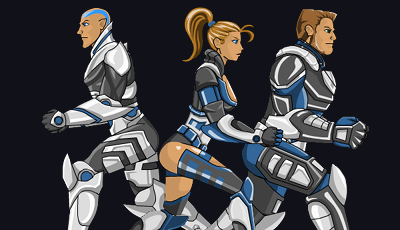
To create a new character, you must select a class, a gender, and a
unique name. You can also customize the color and hairstyle of your
character. Once satisfied with the changes, click "Save" to proceed to
the main login screen.
When your character is saved successfully, click the "Play EpicDuel" button to enter EpicDuel's unique world known as Delta V.
4. EXPLORING DELTA V
To move your character around the world, left-click the mouse at the destination where you would like your character move.
The world is designed as a series of screens each with several
interactive hotspots. As you move your mouse over hotspots and near
edges of the screen, you'll notice your cursor change to a directional
arrow. This arrow indicates that you have encountered a hotspot and can
move your character to the nearby area by left-clicking on the hotspot.
In addition to hotspots, you will also encounter several non-player
characters (NPCs). NPCs drive the storyline of the game, and sell items.
Be sure to click on each NPC you encounter to learn more about the game
and discover the best weapons.
5. THE CONTROL PANEL
When you first login to EpicDuel, you will notice several interface
controls at the bottom of the screen. These controls include:
- Character Stats: Shows your character's current Skill Tree and Stats.
- Chat Field: This is where you can type in to submit messages to players that are in the same room as you.
- Send Button: This is where you type in your messages for the Chat Field.
- Find Solo Battle: Sends you into a one on one match with another player.
- Find Team Battle: Sends you into a two on two match with three other players.
- Chat Log: Stores all previous messages up to a certain amount of lines.
- Buddy List: Stores all of your friends, up to 100 friends maximum. Players starts out with 10.
- Missions: Contains information on the mission you are currently on.
- Inventory: Stores all your items and equipments.
- World Map: Brings up the world map of Delta V.
- Faction: Brings up your faction's stats. Must be in a faction to see your stats.
- Achievements: Brings up your character's achievements.
- Leaderboard: Brings up the leaderboards.
- Homes: Brings up the EpicDuel Real Estate Manager.
- What's New?: Shows the last additions and updates to EpicDuel.
- Settings: Opens up the settings for the game.
6. CHARACTER STATISTICS
When beginning EpicDuel, players should familiarize themselves with
their character's statistics. To view your stats, click on the circular
orb to the right of your character's profile image in the lower-left
corner of the screen.
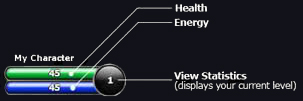
You'll be taken to the character stat menu. On the left side of the
screen, you will find several attributes that affect the game play. On
the right side, you will see your character's unique skill tree.
The attributes listed below improve your character's performance in
different ways. Roll your mouse over each attribute in the stats screen
to view a brief description of how it affects the game play. There are 6
primary attributes that you can invest points in every time you level
up. These attributes are listed below:
- Health - The life force; when you reach zero health, your character is knocked out.
- Energy - Energy is needed in order to perform most skills.
- Strength - Increases base damage of primary weapons and guns.
- Dexterity - Increases Defense; also increases chance to block.
- Technology - Increases Resistance, increases robot damage, and increases chance to deflect.
- Support- Increases the base damage of auxiliary weapons, increases chance to crit, decreases chance to be stunned.
There are also other stats that are affected by these primary attributes. These are:
- Focus - Improves robot damage for all attacks through an even distribution of stat points.
- Agility - Decreases as the character's health increases. Lower agility results in penalties to defense and resistance.
- Defense - Reduces damage taken from Physical attacks.
- Resistance - Reduces damage taken from Energy attacks.
7. SKILLS
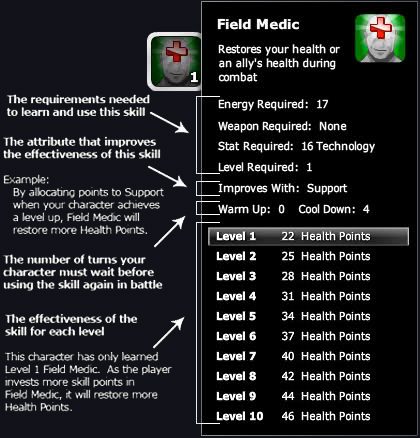
Your character's unique skill tree is found on the right side of the
stats menu. Each character class has a unique skill tree and can learn
12 unique skills. Skills are special abilities that your character can
use while in battle. Roll your mouse over each skill icon to discover
all of the abilities your character can eventually learn.
New players begin with three skills. You'll notice that the number
"1" appears in the lower right corner of each skill icon in your
character's first row of the skill tree. The number indicates the
current level of each skill your character has. If an icon is black and
white, and it does not display the level number in the lower-right
corner, your character does not yet have this skill.
 8. EXPERIENCE
When you begin EpicDuel, you'll notice "Experience 0 / 40" in your
stats menu. The numerator "0" indicates the experience you currently
have, and the denominator "40" indicates the experience you need in
order to reach the next level. To earn experience, your character must
compete against other players in battle. In future releases, your
character will have multiple ways to earn experience.
NOTE: Your character can earn experience even if
you lose a battle as long as you remain until the conclusion of the
battle. If you leave for any reason before the battle completes, you
will earn no experience.
9. LEVEL
As you earn experience, your character will reach higher levels.
There are two ways to determine how much experience you need to reach
the next level.
- Click the "View Stats" button in the lower-left corner to view the "Experience" field.
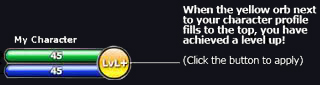
- Look at the "View Stats" button, once the yellow color fills the orb, you have a level up available.
The "View Stats" button will says "Lvl+" when a level up is available
for your character. To apply the level up, click on the "View Stats"
button, and allocate the attribute points and skill points to the areas
you wish to improve. When you're ready, click the "Level Up" button to
apply the change.
 NOTE: How you allocate your attribute and skill points is very important to how your character will perform in battle.
10. CURRENCIES
Credits
NOTE: How you allocate your attribute and skill points is very important to how your character will perform in battle.
10. CURRENCIES
Credits are the main currency on Delta V. Players
require credits to purchase weapons, items, and improve their
characters. Players earn credits by dueling, completing missions and
playing the arcade.
Varium is EpicDuel's premium currency.
Varium can be purchased in-game using
Artix Points.
Varium can be used to purchase more powerful items in order to dominate
the battlefield and unlock exciting additional features.
Battle Tokens are a special currency that are earned
by winning battles. Tokens can be used to purchase achievements or to
help your faction in the faction war.
11. CHATTING / ACTIONS
EpicDuel allows your character to chat in real-time with other users.
To send a chat message, type your message into the chat field on the
control bar at bottom of the screen. To send your message, either click
"Send" or press the "Enter" key on your keyboard.
Your character also has a collection of actions he or she can perform
that will be seen by any users in the nearby vicinity. These include
actions: /dance, /jump, /kick, /point, /wave, /bow and many more!
NOTE: Because the EpicDuel community is
comprised of players of all ages, we enforce a strict zero-tolerance
policy for foul language, sexually explicit chat, public solicitation,
or any other form of abuse. Messages containing bad words are
prohibited, and players attempting to abuse the system risk having their
chat privileges permanently removed. Additionally, be advised that all
chat messages are logged and are subject to review by our abuse
department.
12. INVENTORY
Your character can carry several weapons, items, and collectibles as
they explore the EpicDuel world. To view your inventory, click the
"Inventory" button in the control panel at the bottom of the screen. If
you're unsure which button is which, just roll your mouse over each icon
to see a tool tip that says what each button does.
When the inventory menu opens, your character's inventory appears on
the right side of the screen. Character statistics are displayed along
with your inventory so you can see how each item affects your character
as it is equipped.
If you are just starting out, your character comes pre-equipped with a
basic weapon by default. To find better weapons, you will need to chat
with any of the merchants found across the map and purchase them with
credits.
13. ITEMS
Your character can purchase and find several items while playing
EpicDuel. By clicking the "Inventory" button on the main interface, you
can see everything your character is carrying. The following is a list
of the different types of items in EpicDuel:
- Sword
- Club
- Wrist Blade
- Staff
- Armors
- Gun
- Auxiliary
- Robots
- Vehicles
- Miscellaneous
The upper box on the right side of the inventory screen provides several details about the currently selected weapon:
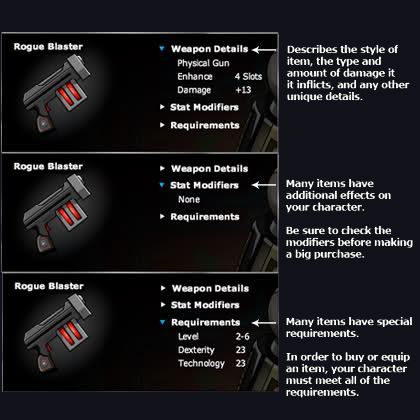
Items have several effects on the game play, including increasing
your character's damage and modifying your character's normal stat
attributes.
Many items have requirements that must be met before you can equip
them. Some items require that your character be a certain level and
others require that your character has reached a specific value in
multiple stat attributes. If your character does not meet the
requirements to purchase or equip an item, the "Requirements" drop down
menu will appear red within the Inventory screen.
Consumable items can replenish your health and energy in battle. Your
character can equip up to two consumable items at a time and can use
them on your own turn in battle.
14. FIND BATTLE (AUTO-MATCH)
Player-vs.-Player (PvP) battle is the primary focus of EpicDuel. Our
unique turn-based battle engines automatically matches your character
with up to three other players in an epic duel. To quickly find a
battle, click the "Find Battle" button at the bottom of the screen. The
find battle panel will slide out with options.
Click "Solo" or "Team" depending on the type of battle you want to
enter. You will be taken to a waiting screen where the system will find
appropriately challenging opponents for you to fight.
NOTE: Your character must have a primary weapon equipped in order to enter a battle.
15. CHALLENGE BATTLE
Players can now challenge other specific players directly. To
challenge another player, click on the character you would like to
challenge on any regular map screen. The selected character panel will
appear showing you the character's health, energy, and stats. Above the
menu you will find the "Challenge" button. Click "Challenge" to send a
challenge request to the selected player. If the other player accepts
your challenge, you will be taken to the battle engine in a 1vs1 match
with the selected character. Challenge battles do not count toward your
battle record.
16. THE BATTLE ENGINE
A battle will begin when the system finds an appropriate match for
your character in the auto-match engine, or if you have challenged
another user, the battle will begin when the other player accepts your
challenge.
In auto-matched battles, the computer will balance them teams in the
most fair way possible based on the level of the characters in battle.
The EpicDuel battle engine is turn-based, meaning that players take
turns issuing battle commands. When it is your turn, you will have 15
seconds to react. This system creates an element of strategy and timing
as players must balance when to use their skills and which enemies to
attack given their limited energy supply.
On your turn you have a few options:
- Strike - performs a basic attack using your currently equipped weapon
(consumes NO energy)
- Fire Sidearm / Fire Auxiliary - fires your currently equipped
Gun or Auxiliary, performing an unblockable attack (consumes NO energy)
- Skill - click any skill icon to use the skill
(consume energy based on the value listed in the skill details menu)
- Item - click any item icon to consume the item


 (3 votes, average: 3.33 out of 5)


